Experience The

Future Of

REMOTE

Photography

Experience The

Future Of

REMOTE

Photography

Capture The
World
TMN Remote

TMN Remote connects two users—allowing one to capture high-resolution photos using the other’s phone, live and in real time. No special gear, no lag—just sharp, studio-quality shots from anywhere in the world.

Whether you’re a model, photographer, or creative, TMN Remote gives you the power to shoot with anyone you seek out—or anyone within the app’s growing community. From spontaneous collabs to professional campaigns, it’s the easiest way to create together, wherever you are.

Simple. Seamless. Limitless. TMN Remote isn’t just an app—it’s a tool built for a new era of visual storytelling.

Step By Step

Connect instantly with another user (model or brand) for a live video call and real-time photo session. Communicate naturally as you direct and capture professional images remotely.

Each photo appears automatically in your secure storage page—no local saving required—where you can review, select, and download your best shots.

The entire process is seamless, safe, and cloud-based, keeping every capture organized under your TMN account. Tap Get Started to begin your remote shoot.

The Results
QUALITY UNMATCHED
Eli
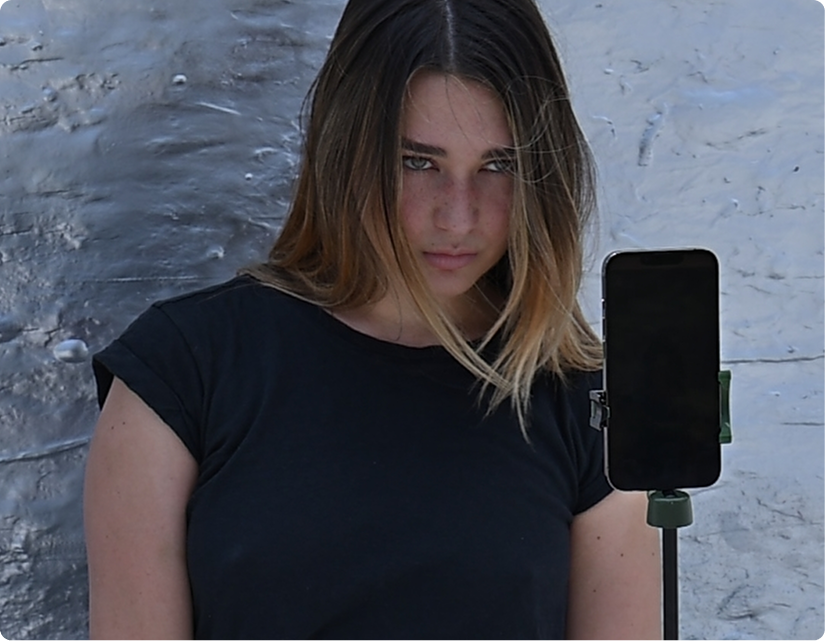
Eli lives in Brooklyn, and for this session, we asked her to step outside with her phone and capture the energy of the streets around her. From our studio in Vancouver, we connected remotely and directed the entire shoot in real time—adjusting angles, poses, and lighting through the live feed.

Eli used an iPhone 14 mounted
on a tripod, giving us sharp, professional-quality shots while she focused on movement and expression, turning a simple setup into a seamless cross-country photoshoot.
Emma
Emma reached out to us online after searching for photographers in her area of Arizona. Originally from Italy and studying abroad, she wanted to try something new for her portfolio and decided to book a remote photoshoot. We connected through the app and guided her through poses and lighting adjustments in real time.

Emma used a Pixel 6 mounted on a tripod with a ring light, allowing us to capture clean, professional images without needing to be in the same location.

Frequently Asked Questions

Everything you need to know about TMN Remote

No, anyone can take photos on TMN Remote! Regardless of your account type, as long as you initiate the call, you can capture photos remotely.

The person who starts the session becomes the photographer for that session and has full control over capturing photos on the other participant's device. Whether you're a professional photographer, model, or just trying out the platform, you have the same ability to direct and capture photos when you initiate the call.

This flexible approach means both photographers and models can switch roles depending on who initiates the session.

Starting a remote photo shoot on TMN Remote follows these steps:

  • 1. Search for a user: Find the model, friend, or user you want to shoot with using the search function.
  • 2. Follow them: Send a follow request and wait for them to accept.
  • 3. Initiate a chat: Once connected, start a chat conversation with them.
  • 4. Set a shoot date: Coordinate and schedule your photo shoot date within the chat.
  • 5. Both users enter the chat: On the scheduled shoot date, both participants must be in the chat before the call can begin.
  • 6. Start the shoot: Once both users are present, the "Start Shoot" button will appear. Tap it to begin the call.
  • 7. Capture photos: During the call, the person who initiated the session can remotely trigger photo captures. Each photo costs 1 credit.
  • 8. End the shoot: When finished, end the call. The photographer's end screen will display an option to view all captured photos.

All captured content is automatically uploaded to secure cloud storage and can be accessed anytime through the app or downloaded from web.tmn-remote.com.

TMN Remote requires the following permissions to function properly:

  • Camera: Essential for capturing photos during remote sessions. The app needs access to both front and rear cameras.
  • Microphone: Required for audio during live calls between participants.
  • Photo Library: Allows the app to save captured content to your device and access previously saved media.
  • Network Access: Necessary for real-time streaming and uploading media to cloud storage.

All permissions are requested only when needed, and you'll receive clear prompts explaining why each permission is necessary. Your privacy and security are our top priorities.

TMN Remote is optimized for modern mobile devices. For the best experience, we recommend:

iOS Devices:

  • iPhone 12 or newer
  • iPad Pro (2020 or newer) or iPad Air (4th generation or newer)
  • iOS 15.0 or later (iOS 17+ recommended)

Android Devices:

  • Flagship devices from Samsung, Google Pixel, or OnePlus (2021 or newer)
  • Minimum 4GB RAM (6GB+ recommended)
  • Android 10 or later (Android 13+ recommended)

Devices with better cameras, processors, and more RAM will provide smoother streaming, faster capture processing, and quicker uploads to the cloud.

Minimum Requirements:

  • Download: 10 Mbps
  • Upload: 5 Mbps
  • Ping: Under 50ms (lower is better)

Recommended for Best Performance:

  • Download: 25+ Mbps
  • Upload: 10+ Mbps
  • Ping: Under 30ms

Tips to Reduce Latency:

  • Use a 5GHz WiFi connection instead of 2.4GHz when possible
  • Position yourself closer to your WiFi router
  • Close unnecessary apps running in the background
  • Use a wired connection for your router if available
  • Consider upgrading your internet plan if you consistently experience delays

TMN Remote automatically adjusts streaming quality based on your connection to maintain smooth performance.

TMN Remote is currently a mobile-only application available for iOS and Android devices. The app is specifically designed to leverage mobile device cameras for professional photo capture.

However, you can view and download your captured media from any web browser by visiting web.tmn-remote.com. This web portal allows you to:

  • Browse all your captured photos
  • Download media to your computer
  • Organize and manage your session content
  • Share content with clients or collaborators

A desktop app is not currently planned, as the mobile experience is essential to TMN Remote's core functionality.

If you're experiencing connection problems during a session, try these troubleshooting steps:

  • Check your internet connection: Ensure you have a stable connection with adequate speed (see network requirements above)
  • Restart the app: Close TMN Remote completely and reopen it
  • Switch networks: Try switching between WiFi and cellular data to see which performs better
  • Update the app: Make sure you're running the latest version of TMN Remote
  • Restart your device: A simple device restart can resolve many connectivity issues
  • Check permissions: Ensure all required permissions are enabled in your device settings

If problems persist, contact our support team through the app's Help section for personalized assistance.

TMN Remote uses a capture credit system for a flexible, pay-as-you-go experience. Each photo capture costs 1 credit.

Credits can be purchased through the app and never expire. Both photographers and models can purchase credits, though typically the person initiating the session manages credits for that session. You'll always see your credit balance before initiating a capture.

Free trial credits are available for new users to test the platform before purchasing.

All captured photos are securely stored in cloud storage (Amazon S3) with enterprise-grade security. Your content is:

  • Automatically uploaded during or immediately after capture
  • Encrypted during transmission and at rest
  • Accessible anytime through the mobile app or web portal
  • Kept indefinitely as long as your account remains active
  • Backed up redundantly across multiple data centers

You maintain full ownership of all content and can download or delete it at any time. Visit web.tmn-remote.com to manage your media library.

Yes, absolutely! TMN Remote is fully cross-platform compatible. An iOS user can connect with an Android user, and vice versa. The app uses WebRTC technology, which ensures seamless real-time communication across different operating systems.

All features work identically regardless of which platform each participant is using, including photo capture, live streaming, and cloud uploads.

We regularly update TMN Remote to improve performance, add features, and ensure compatibility with the latest mobile operating systems. Updates typically include:

  • Performance optimizations and bug fixes
  • New features based on user feedback
  • Security enhancements
  • Compatibility updates for new iOS and Android versions

We recommend enabling automatic updates in your device's app store settings to ensure you always have the latest improvements and security patches.